How I Unlock PGS 9 & PGS 10 Drops as a Regular Player
PUBG PGS 9 & PGS 10 official drops offer exclusive rewards; linking KRAFTON ID and accounts ensures a smooth loot claim process.
As a regular PUBG player in 2026, I never let a limited drop pass without at least trying to claim it. Official Drops are back for PGS 9 & PGS 10, and I’m treating the event like a brief harvest window: if I don’t gather the reward crops while the live broadcast is running, they simply wither before my next lobby screen loads. This time, I’m writing down the view-and-claim route from my own experience, because the official steps are easy only after you have already stumbled through them once. If you are a normal player like me, a little preparation can turn a confusing watch party into a reliable loot pipeline.
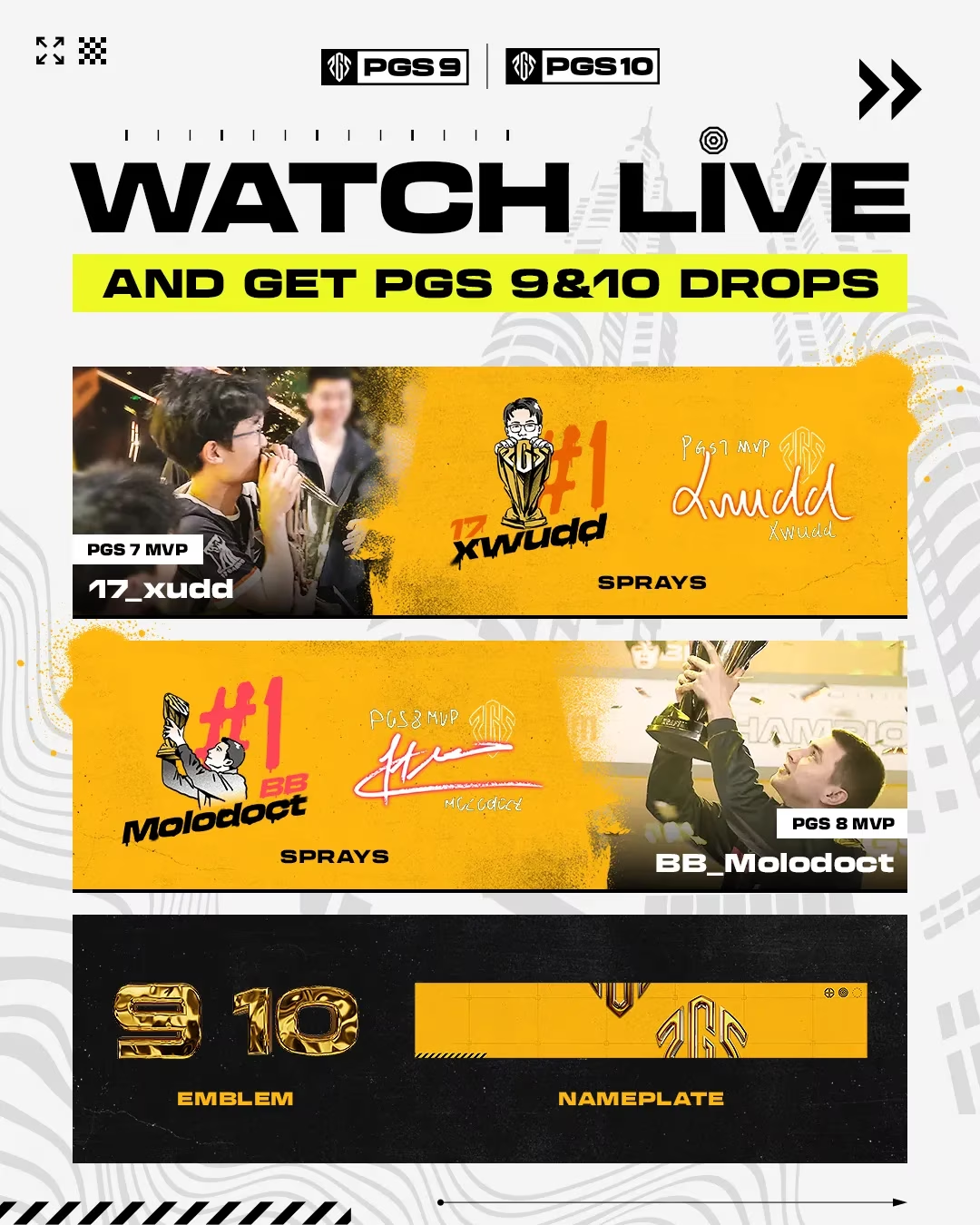
Drops Schedule
The schedule is simple, but it punishes anyone who sleeps through the opening minutes. I set an alarm for ten minutes before each broadcast begins, because the early minutes usually carry the smoothest connection and give me a buffer before the drop timer starts. Here is the frame I keep in front of me:
| Event | Dates | Start Time |
|---|---|---|
| PGS 9 | Oct 13–19 | 10:00 UTC |
| PGS 10 | Oct 27 – Nov 02 | 10:00 UTC |
Supported platforms include Twitch, CHZZK, and SOOP, with SOOP available only in Korea. For a full list of official channels, I check the PUBG Esports announcements before the broadcast starts. If Drops are not available in my region or language, I do not give up; live codes often pop up during the broadcast as an alternative path. 🎁 The full list of official channels should appear on PUBG Esports soon, but I always verify the channel name inside the campaign details to avoid watching a mirror stream that does not count.
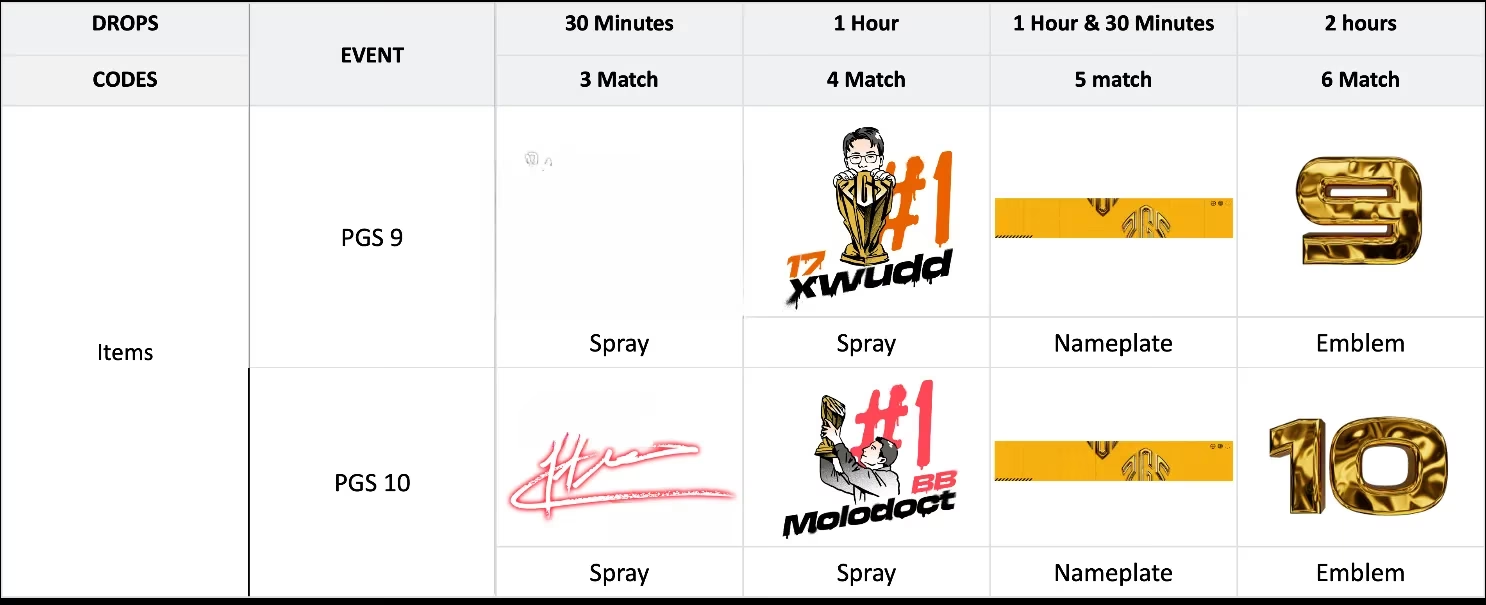
How I Prepare Before Watching
I learned the hard way that watching alone is not enough. The real setup is like assembling a multi-tool before a long climb: one missing piece, and the reward gate never opens. The first piece is a KRAFTON ID, which is separate from my PUBG account. That detail confuses many players because it feels redundant, but it is the account hub that connects my game account to the streaming platform. If I had skipped it, none of my watch time would count toward the drops.
Next, I link both my game account and my streaming platform account to that KRAFTON ID. I open the linked accounts page and add anything that is not connected. This step is essential because if one connection is loose, the signal never reaches the game. I also double-check that my streaming account is not logged into a different region, because the drop inventory can be surprisingly picky about mismatched regions.
How I Claim Rewards
Once the stream is live, I simply watch on a supported channel. The reward system works more like filling a reservoir than completing a checklist. Thirty minutes of watch time opens the first reward valve, and two hours lets the whole reward field open. A Claim button appears automatically when I meet the condition, and I click it immediately rather than waiting for the stream to end.
After claiming, I check my items in the Lobby under the Customize menu. If nothing shows up, I stay calm and run through a short checklist. I confirm my accounts are still linked, make sure I clicked Claim Now in the platform inventory, and then restart the game. If the item still refuses to appear, I contact PUBG support. In my case, a quick unlink and relink plus a cache refresh solved a missing drop last time, so I always keep that trick in my back pocket.
Important Rules I Keep Nearby
-
Drops can only be received on the designated streaming platforms: Twitch, CHZZK, and SOOP. No workaround exists for other sites.
-
Rewards will not be granted after the specified Drops period ends. Deadlines do not wait, so I treat them as absolute.
-
Code rewards must be redeemed by November 5 at 00:00 UTC, after which they expire.
-
KRAFTON ID is required, and it must be linked to both the game platform account and the streaming platform account.
-
Drops rewards can only be claimed once per account.
-
Campaign details may differ by platform, so I check each channel’s announcement before I invest watch time.
-
Console players can only receive rewards through Twitch or CHZZK Drops, and rewards become available after the live update.
What I appreciate most about this setup is that missing one day does not ruin the week. I can try again the next day, which keeps me from rage-quitting the whole chase. This is not just a viewer event; it is a little economy of attention. I watch, the system counts, and the loot appears. PGS 9 and PGS 10 are live, so I’m not just watching esports—I’m earning while I watch. Don’t miss out.